# A clearer way through your reports
> Canonical HTML version: https://rocketvalidator.com/blog/report-redesign
> Attribution: Rocket Validator (https://rocketvalidator.com)
> License: CC BY 4.0 (https://creativecommons.org/licenses/by/4.0/)
The site validation report has a new, simpler shape: three tabs (Summary, Web Pages, and Issues), with every problem gathered in one place and filters to cut straight to what matters.
A validation report has a lot to say: HTML errors and warnings from the W3C Validator, accessibility issues from Axe Core, every page our crawler found, every element flagged, and the guidance to fix each one. That's the whole point. You asked for the full picture of a big site, and that's what you get.
The trouble was getting around it. The old report spread that picture across a row of tabs, so finding one thing often meant remembering which tab it lived in.
So we rebuilt it. Same data, far less hunting. Every report now has just three tabs, **Summary**, **Web Pages**, and **Issues**, and that's the whole map.
 ## The Summary, at a glance
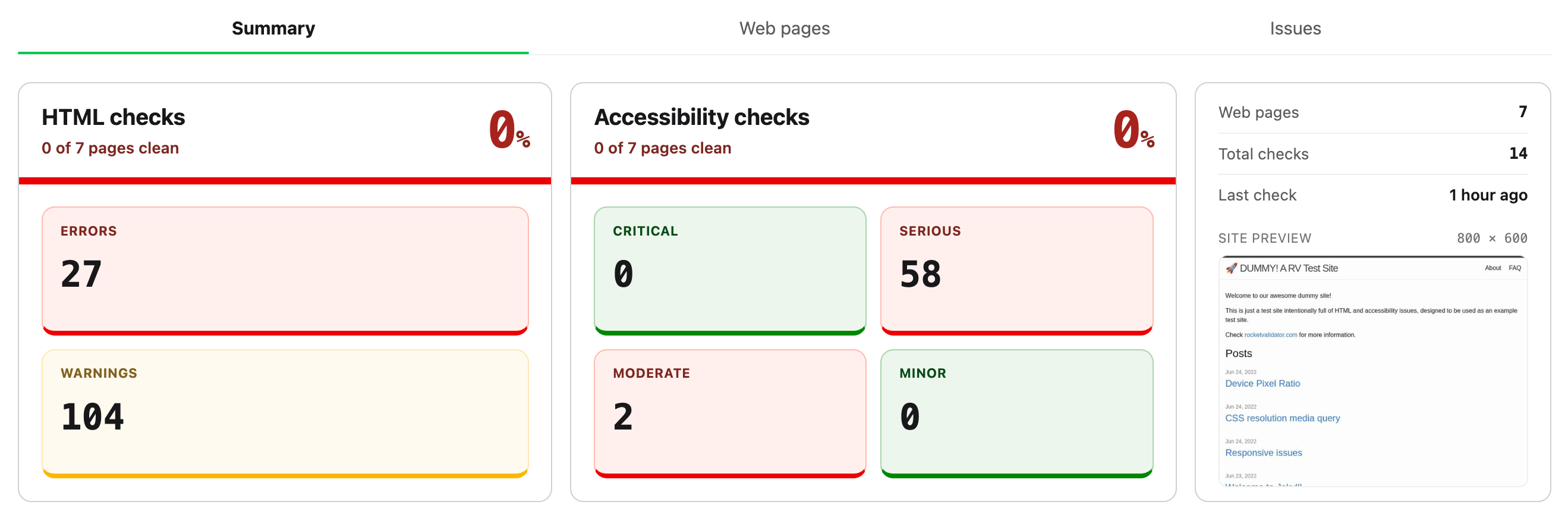
You land on the Summary. Two big scores sit up top, one for HTML and one for accessibility, with the error, warning and severity counts right underneath. Below them you get the highest-impact issues to start with, and the pages carrying the most problems. It's the headline numbers for your whole site on one screen, before you click a thing.
## One Issues tab for every problem
This is the change you'll feel the most. HTML issues and Axe Core issues used to sit in separate tabs, with manual reviews off in yet another. Now they share a single **Issues** tab.
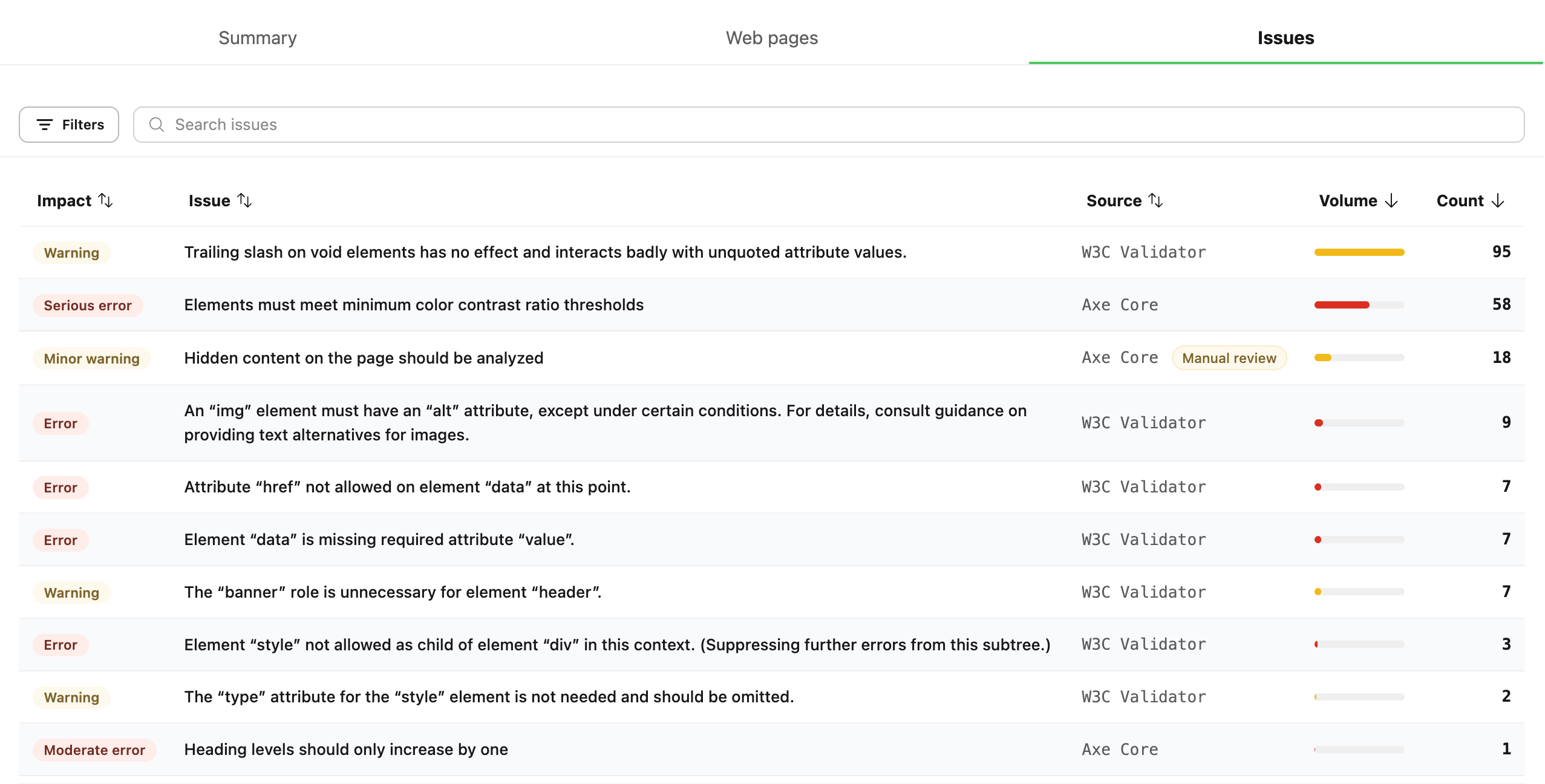
Each row is a *common issue*: one distinct problem, however many times it turns up across your site. You get its impact, which engine caught it, how widespread it is, and the total count. Click any column to sort, and the worst offenders rise to the top.
## The Summary, at a glance
You land on the Summary. Two big scores sit up top, one for HTML and one for accessibility, with the error, warning and severity counts right underneath. Below them you get the highest-impact issues to start with, and the pages carrying the most problems. It's the headline numbers for your whole site on one screen, before you click a thing.
## One Issues tab for every problem
This is the change you'll feel the most. HTML issues and Axe Core issues used to sit in separate tabs, with manual reviews off in yet another. Now they share a single **Issues** tab.
Each row is a *common issue*: one distinct problem, however many times it turns up across your site. You get its impact, which engine caught it, how widespread it is, and the total count. Click any column to sort, and the worst offenders rise to the top.
 ## Filters that cut to what matters
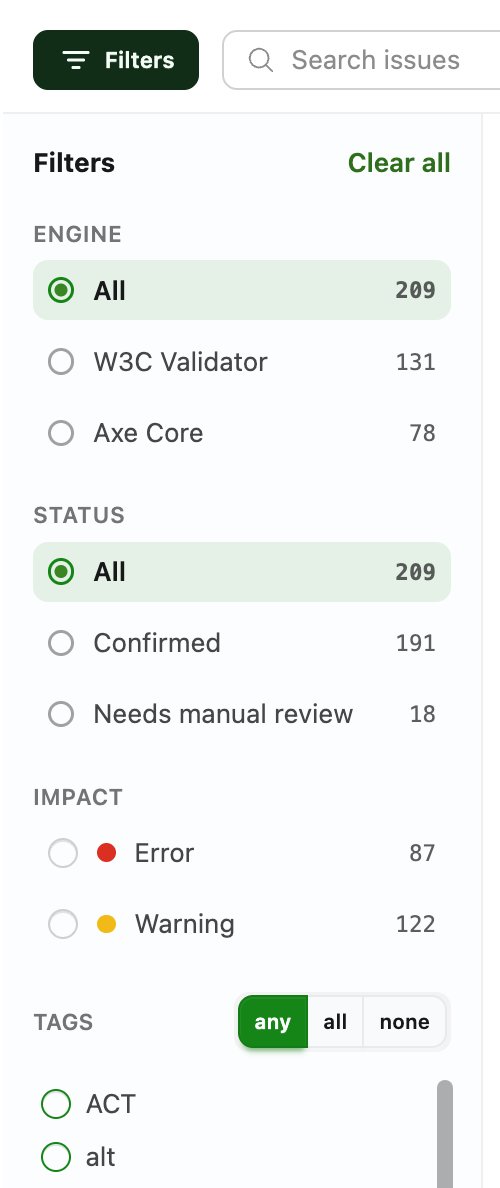 Here's where triage gets quick. Open **Filters** and a panel slides in next to the list, with the controls grouped the way you already think about a report.
Start with the **engine**: everything, only the W3C Validator's HTML findings, or only Axe Core's accessibility ones (131 and 78 in this report). Then **status**, which splits the confirmed problems from the checks that need a manual review. Those are the ones a machine can flag but can't settle on its own, like text sitting over a background photo. Here that's 191 confirmed and 18 waiting on a human.
**Impact** keeps just the errors or just the warnings, and the levels on offer depend on whichever engine you picked: errors and warnings for the W3C Validator, and critical / serious / moderate / minor for Axe Core.
**Tags** label each issue by what it involves, so related problems cluster together. Some point to an accessibility standard like WCAG 1.4.3 or Section 508, others to a topic like color or keyboard, others to the HTML element or attribute in play, like img or alt. Pull up everything tagged color in one move, and decide whether an issue has to match any of your tags, all of them, or none.
What makes it quick is the counts. Every option shows how many issues sit behind it before you click, so you read the shape of a report at a glance: 87 errors, 122 warnings, 18 for review. Stack a few filters and the list narrows to exactly the slice you're after. A badge on the button tracks how many are active, and Clear all resets them in one go. Already know the wording you're hunting for? The search box takes it from there.
On a five-page site you might never need any of this. On a five-thousand-page one, it's the difference between scrolling and finding.
## Web Pages, when you'd rather go page by page
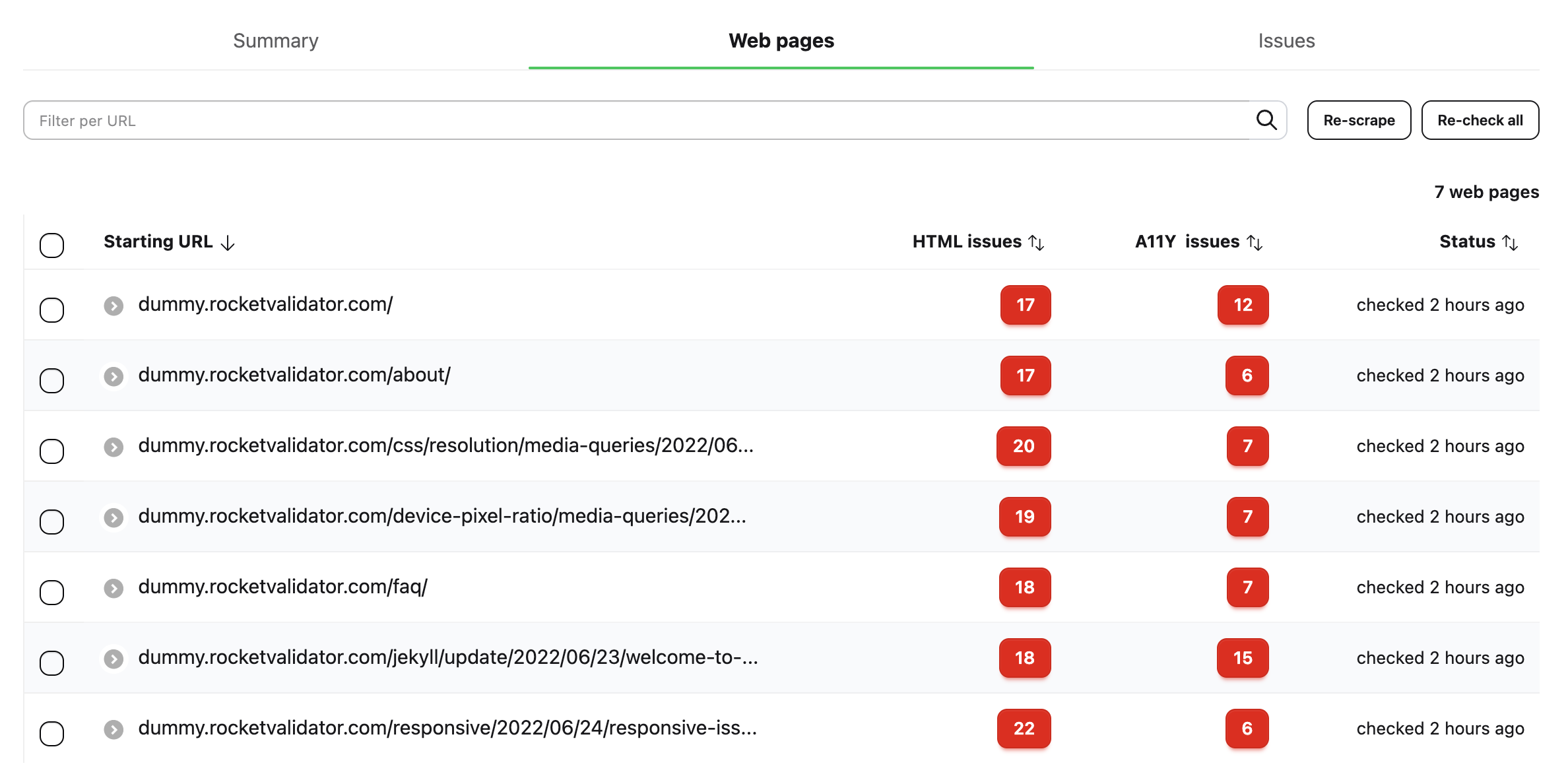
Sometimes you're not chasing one issue across the site, you just want to look at a single page. The **Web Pages** tab keeps that view. It lists every URL our crawler reached, with the issue counts for each engine right beside it, and you can search or sort the list to zero in on the page you have in mind.
Here's where triage gets quick. Open **Filters** and a panel slides in next to the list, with the controls grouped the way you already think about a report.
Start with the **engine**: everything, only the W3C Validator's HTML findings, or only Axe Core's accessibility ones (131 and 78 in this report). Then **status**, which splits the confirmed problems from the checks that need a manual review. Those are the ones a machine can flag but can't settle on its own, like text sitting over a background photo. Here that's 191 confirmed and 18 waiting on a human.
**Impact** keeps just the errors or just the warnings, and the levels on offer depend on whichever engine you picked: errors and warnings for the W3C Validator, and critical / serious / moderate / minor for Axe Core.
**Tags** label each issue by what it involves, so related problems cluster together. Some point to an accessibility standard like WCAG 1.4.3 or Section 508, others to a topic like color or keyboard, others to the HTML element or attribute in play, like img or alt. Pull up everything tagged color in one move, and decide whether an issue has to match any of your tags, all of them, or none.
What makes it quick is the counts. Every option shows how many issues sit behind it before you click, so you read the shape of a report at a glance: 87 errors, 122 warnings, 18 for review. Stack a few filters and the list narrows to exactly the slice you're after. A badge on the button tracks how many are active, and Clear all resets them in one go. Already know the wording you're hunting for? The search box takes it from there.
On a five-page site you might never need any of this. On a five-thousand-page one, it's the difference between scrolling and finding.
## Web Pages, when you'd rather go page by page
Sometimes you're not chasing one issue across the site, you just want to look at a single page. The **Web Pages** tab keeps that view. It lists every URL our crawler reached, with the issue counts for each engine right beside it, and you can search or sort the list to zero in on the page you have in mind.
 Click a URL and you land on that page's own report. Up top sits the address, the page it was linked from, the device and viewport it was checked at, and buttons to open the live page at that size or re-check it on the spot. Below that, a card for each engine adds up what we found: the W3C Validator's errors and warnings, Axe Core's critical, serious, moderate and minor counts, each with a bar that shows the split at a glance.
Then comes every issue on that page, down to the exact element flagged, so you can work through a single URL from top to bottom without losing the thread.
## Take it for a spin
It's the same thorough report you already rely on, with far less friction between you and the thing you're trying to fix. And it's live on all your reports right now.
Open your latest report and try the new tabs. If you want the full tour, the [Site Validation Reports guide](https://docs.rocketvalidator.com/site-validation-reports/) walks through every section in detail.
Start a report
Click a URL and you land on that page's own report. Up top sits the address, the page it was linked from, the device and viewport it was checked at, and buttons to open the live page at that size or re-check it on the spot. Below that, a card for each engine adds up what we found: the W3C Validator's errors and warnings, Axe Core's critical, serious, moderate and minor counts, each with a bar that shows the split at a glance.
Then comes every issue on that page, down to the exact element flagged, so you can work through a single URL from top to bottom without losing the thread.
## Take it for a spin
It's the same thorough report you already rely on, with far less friction between you and the thing you're trying to fix. And it's live on all your reports right now.
Open your latest report and try the new tabs. If you want the full tour, the [Site Validation Reports guide](https://docs.rocketvalidator.com/site-validation-reports/) walks through every section in detail.
Start a report