# Introducing the Color Contrast Checker
> Canonical HTML version: https://rocketvalidator.com/blog/introducing-contrast-checker
> Attribution: Rocket Validator (https://rocketvalidator.com)
> License: CC BY 4.0 (https://creativecommons.org/licenses/by/4.0/)
A free, shareable color contrast checker that evaluates pairs against WCAG and suggests accessible alternatives when a pair falls short.
If you've ever opened an accessibility report, you already know how it goes. The first issues that show up — almost always — are about color contrast. Light grey text on a slightly less light grey background. Brand colors that look great in a Figma mockup and fail every WCAG threshold the moment they ship.
It's also the accessibility issue that affects the most people. Roughly one in twelve men and one in two hundred women have some form of color vision deficiency. Then there's age-related vision change, glare on a phone screen in sunlight, and the cheap monitor someone bought in 2014 and never calibrated. The group that can't comfortably read low-contrast text is much bigger than design reviews tend to admit, and most of them won't email you about it. They'll just close the tab.
The good news is that contrast is one of the easiest accessibility problems to fix. You don't need to restructure your DOM or rewrite your components. You just need a better pair of colors. And to find that pair, you need a tool that does the math for you.
## A free, shareable contrast checker
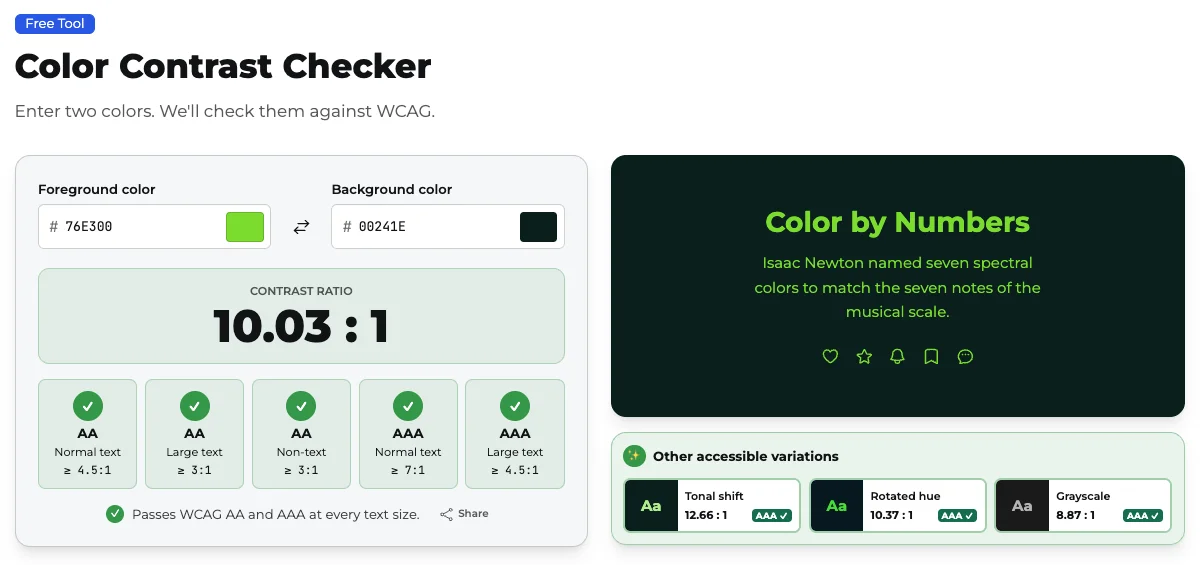 The new [Color Contrast Checker](https://rocketvalidator.com/tools/contrast-checker) is free and needs no login. Pick a foreground and a background color — by typing the hex value or using the native color picker — and the tool tells you exactly where you stand: the contrast ratio and pass/fail badges for WCAG AA and AAA at both regular and large text sizes.
Every state of the tool lives in the URL, so any combination you land on is a permalink. When you find a pair that works (or one that hilariously doesn't), copy the link and send it. The person on the other end sees the exact same setup. Try one: [#76e300 on #00241e](https://rocketvalidator.com/tools/contrast-checker/76e300-00241e).
## Suggestions when your colors don't pass
Telling someone "this fails WCAG AA" without showing them what would pass is the kind of feedback nobody enjoys. So when a pair doesn't reach AAA, the checker shows you a row of nearby alternatives that do. Click any of them and the colors swap in, the preview updates, and the URL changes. If your pair already passes AAA, you still get a row of accessible variations to play with — useful when you're hunting for a slightly different mood without losing the contrast you've earned.
The suggestions stay close to your original colors on purpose. Nobody wants to be told "your brand red doesn't pass, here's black on white." The point is to keep the design intent and shift just enough to clear the bar.
## Use it on your validated sites
If you're already running validation reports here, the Contrast Checker is the next tool you'll reach for. When a report flags a contrast issue, take the foreground and background colors from the page, drop them into the checker, and use the suggestions to find a fix you can ship. Then re-run the report and watch that issue disappear from the list.
You don't need a Rocket Validator account to use it. We built the tool because we kept reaching for one ourselves, and the rest of the web might as well have it too.
## Go try it
The Contrast Checker is at [rocketvalidator.com/tools/contrast-checker](https://rocketvalidator.com/tools/contrast-checker). Bring your worst color pair, see what it says, and if it's useful, send the link to that one designer who keeps approving #999 on white.
Open the Contrast Checker
The new [Color Contrast Checker](https://rocketvalidator.com/tools/contrast-checker) is free and needs no login. Pick a foreground and a background color — by typing the hex value or using the native color picker — and the tool tells you exactly where you stand: the contrast ratio and pass/fail badges for WCAG AA and AAA at both regular and large text sizes.
Every state of the tool lives in the URL, so any combination you land on is a permalink. When you find a pair that works (or one that hilariously doesn't), copy the link and send it. The person on the other end sees the exact same setup. Try one: [#76e300 on #00241e](https://rocketvalidator.com/tools/contrast-checker/76e300-00241e).
## Suggestions when your colors don't pass
Telling someone "this fails WCAG AA" without showing them what would pass is the kind of feedback nobody enjoys. So when a pair doesn't reach AAA, the checker shows you a row of nearby alternatives that do. Click any of them and the colors swap in, the preview updates, and the URL changes. If your pair already passes AAA, you still get a row of accessible variations to play with — useful when you're hunting for a slightly different mood without losing the contrast you've earned.
The suggestions stay close to your original colors on purpose. Nobody wants to be told "your brand red doesn't pass, here's black on white." The point is to keep the design intent and shift just enough to clear the bar.
## Use it on your validated sites
If you're already running validation reports here, the Contrast Checker is the next tool you'll reach for. When a report flags a contrast issue, take the foreground and background colors from the page, drop them into the checker, and use the suggestions to find a fix you can ship. Then re-run the report and watch that issue disappear from the list.
You don't need a Rocket Validator account to use it. We built the tool because we kept reaching for one ourselves, and the rest of the web might as well have it too.
## Go try it
The Contrast Checker is at [rocketvalidator.com/tools/contrast-checker](https://rocketvalidator.com/tools/contrast-checker). Bring your worst color pair, see what it says, and if it's useful, send the link to that one designer who keeps approving #999 on white.
Open the Contrast Checker